

Your account
Open the avatar menu at the top of the panel and choose Profile.
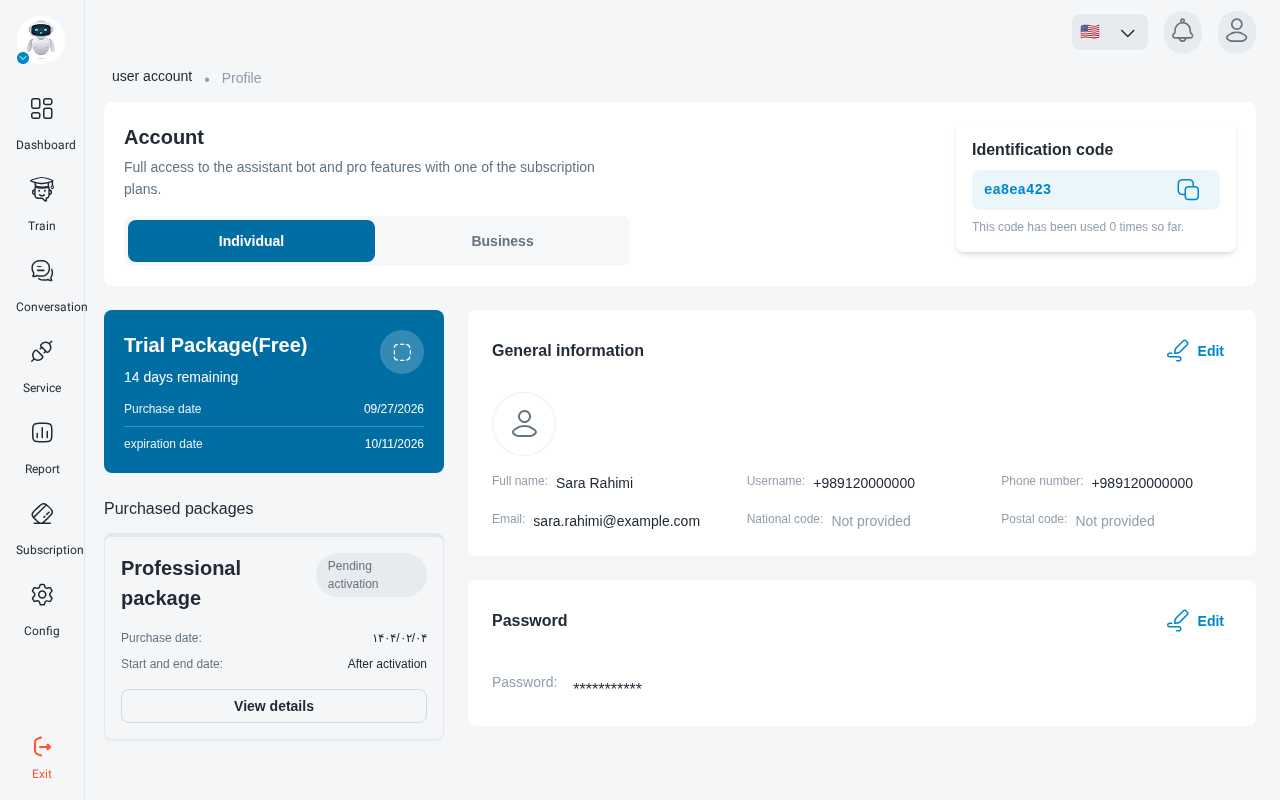
Account type and details
Choose Individual or Business.
- Individual: name, last name, national code and postal code.
- Business: also company name, national ID, economic code, registration number, postal code and address.
Complete these details before you need an invoice: invoices can only be printed once your account information is complete.
Photo and password
- Profile photo: PNG, JPEG or JPG, up to 1 MB.
- Password: change it in the Password section.
Referral code
Your personal referral code is shown on this page. Click Copy referral code to share it.
Your plan
The page shows your active plan with its Purchase date, expiration date and days remaining, marked Expires soon or Expired when relevant. Purchased packages lists packages you’ve bought, including any Pending activation.
With no plan, you’ll see No active subscription and a Buy plan button. See Plans and payments.
Contact support
Open the avatar menu and choose Contact Support. Enter a Subject, pick a category, write your message and click Submit Support Request.
Language and sign-out
Switch the panel between Persian and English from the language menu at the top of the panel. To sign out, click Exit at the bottom of the sidebar.